

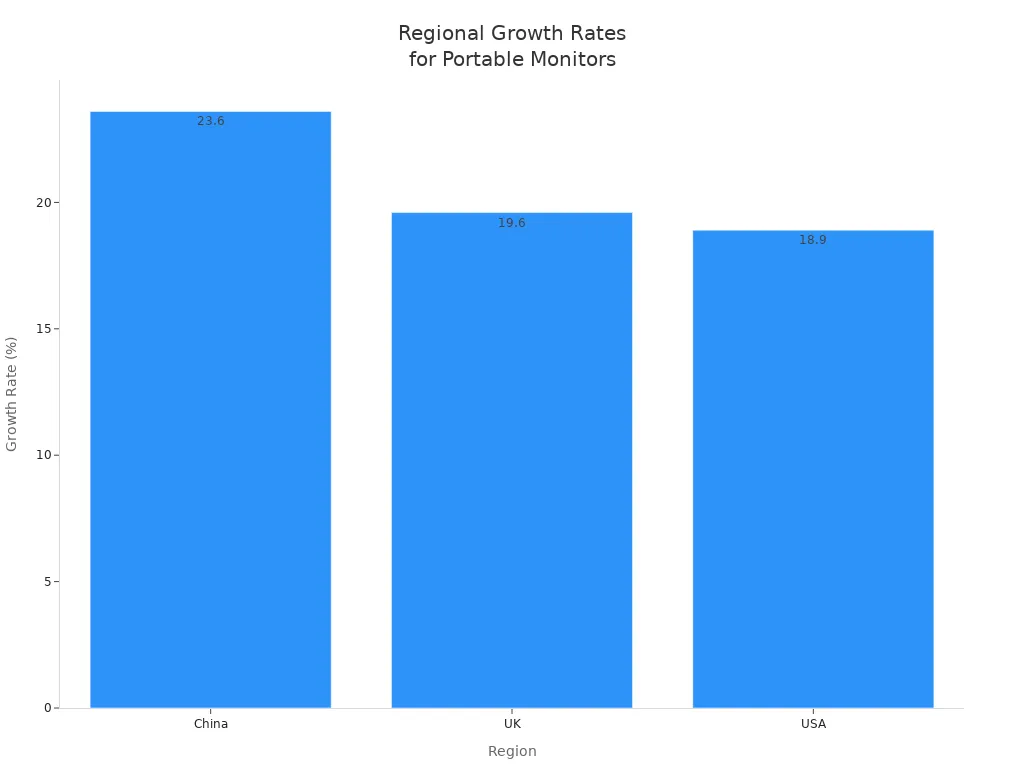
You want the Best Portable Monitor for your needs in 2025. The top models are Ever Glory YW03, Lenovo ThinkVision M14t Gen2, ViewSonic VX1655-4K-OLED, Dell Pro 14 Plus, and Asus ROG Strix XG16AHPE. These monitors have clear screens, good connections, and are easy to carry. More people are buying portable monitors now. This shows you need good features for work, travel, gaming, or art projects. Picking the right monitor for your needs gives you the best value.
Key Takeaways
- Pick a portable monitor that matches what you need most, like work, travel, gaming, or art. This helps you get the best use and value.
- Find monitors with at least 350 nits brightness and USB-C ports. These give you bright pictures and easy ways to connect.
- Choose a screen size that is close to your laptop's size. This makes it more comfortable and helps you work better.
- If you play games, get monitors with high refresh rates and fast response times. This makes your games look smooth and clear.
- Think about how easy it is to carry the monitor. Look for light weight, slim shape, and strong build. This helps you take it anywhere you want.
Comparison Table
Key Specs
You want a portable monitor that works for you. The table below lists the top models for 2025. You can look at screen size, resolution, brightness, connections, best use, and price. Experts say you should get high resolution and IPS or OLED panels. You also need USB-C and HDMI ports. Look for at least 350 nits brightness and a price under $150. These things help you see clear pictures, set up fast, and save money.
| Model | Screen Size | Resolution | Brightness | Panel Type | Connectivity | Best Use | Price Range |
|---|---|---|---|---|---|---|---|
| Ever Glory YW03 | 10.1" | 1280x800 | 400 nits | TFT LCD | LVDS, HDMI, USB, LAN, Type-C | Industrial/Commercial | <$150 |
| Lenovo ThinkVision M14t Gen2 | 14" | 1920x1080 | 300 nits | IPS | USB-C, HDMI | Travel/Work | <$150 |
| ViewSonic VX1655-4K-OLED | 15.6" | 3840x2160 | 400 nits | OLED | USB-C, HDMI | Creative/Gaming | <$150 |
| Dell Pro 14 Plus | 14" | 1920x1200 | 350 nits | IPS | USB-C, HDMI | Productivity | <$150 |
| Asus ROG Strix XG16AHPE | 15.6" | 1920x1080 | 350 nits | IPS | USB-C, HDMI | Gaming | <$150 |
| Arzopa Z1RC/Z1FC | 15.6" | 1920x1080 | 300 nits | IPS | USB-C, HDMI | Value/General | <$150 |
| Espresso Displays 15 Pro | 15.6" | 1920x1080 | 300 nits | IPS | USB-C, HDMI | Features/Travel | <$150 |
| Plugable 15.6" | 15.6" | 1920x1080 | 250 nits | IPS | USB-C, HDMI | Budget | <$100 |
| UPERFECT 18" 4K | 18" | 3840x2160 | 400 nits | IPS | USB-C, HDMI | High Resolution | <$150 |
| Recall 150BW | 15.6" | 1920x1080 | 350 nits | IPS | USB-C, HDMI | Premium | <$150 |
| Asus ProArt PA148CTV | 14" | 1920x1080 | 400 nits | IPS | USB-C, HDMI | Creative | <$150 |
| SideTrak Solo 4K | 15.6" | 3840x2160 | 400 nits | IPS | USB-C, HDMI | 4K/General | <$150 |
| MSI Pro MP161 E2 | 15.6" | 1920x1080 | 250 nits | IPS | USB-C, HDMI | Value | <$100 |
💡 Tip: Pick a monitor with at least 350 nits brightness and USB-C. This gives you a better experience.
Use Cases
- You need a monitor that fits your life. Here are the best choices for each use:
- Work & Productivity: Dell Pro 14 Plus, Lenovo ThinkVision M14t Gen2
- Travel: Lenovo ThinkVision M14t Gen2, Espresso Displays 15 Pro
- Gaming: Asus ROG Strix XG16AHPE, ViewSonic VX1655-4K-OLED
- Creative Tasks: Asus ProArt PA148CTV, ViewSonic VX1655-4K-OLED
- Industrial & Commercial: Ever Glory YW03
- Budget: Plugable 15.6", MSI Pro MP161 E2
You get the best results when you pick features for your main use. If you want sharp pictures, choose a 4K model. If you travel a lot, get a light screen. For gaming, look for high refresh rates. You should have a monitor that fits you.
Best Portable Monitor Reviews
Ever Glory YW03 Portable Monitor
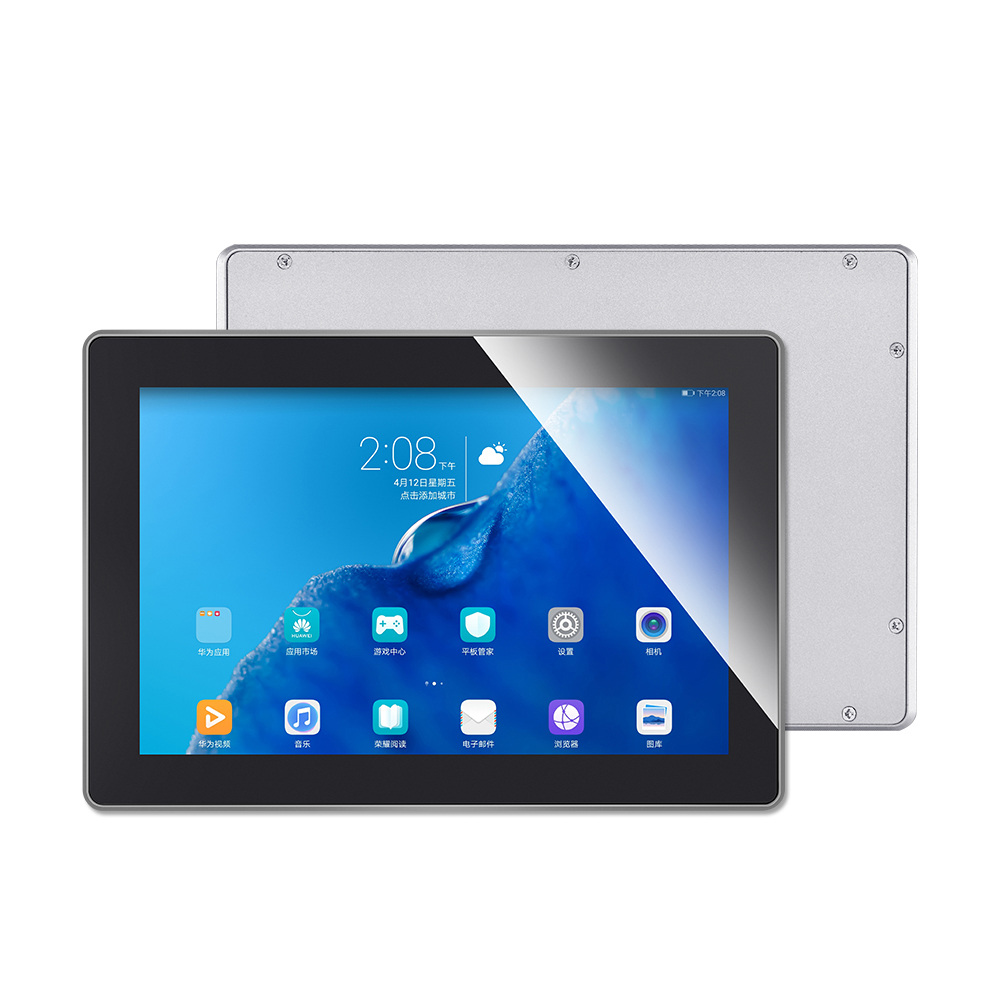
You need a monitor that works everywhere and lasts long. The Ever Glory YW03 is tough and made for hard jobs. It has a 10.1-inch screen with 1280×800 resolution and 400 nits brightness. You can connect it with LVDS, HDMI, USB, LAN, or Type-C. This means it works with many devices. The touch screen is easy to use and reacts fast. It is great for kiosks, smart lockers, medical tools, and control systems. The monitor is strong and works all day, even in rough places.
| Specification | Details |
|---|---|
| Screen Size | 10.1" |
| Resolution | 1280×800 pixels |
| Connectivity | LVDS, HDMI, USB, LAN, Type-C |
| Touch Interface | Capacitive, ergonomic |
| Design | Rugged, industrial-grade |
If you want a monitor for work or business, pick the Ever Glory YW03. It is reliable, flexible, and has a great touch screen.
Lenovo ThinkVision M14t Gen2
You travel for work and need a monitor that is easy to carry. The Lenovo ThinkVision M14t Gen2 weighs only 1.5 pounds and is very thin. You can put it in any bag and use it in hotels, airports, or offices. The 14-inch touch screen has 2240 x 1400 resolution and comes with a pen. You can work, draw, or show things anywhere. It has two USB-C ports for charging and connecting. This helps you avoid too many cables. You can tilt, turn, and change the screen from tall to wide.
- Light and slim for travel
- Two USB-C ports for charging and connecting
- 14-inch touch screen with pen
- Easy to adjust for any desk
- Good for showing work, remote jobs, and art
You get easy use, many options, and can work well anywhere. If you want a travel monitor, choose the M14t Gen2.
ViewSonic VX1655-4K-OLED
You want great pictures for art or games. The ViewSonic VX1655-4K-OLED uses OLED for deep blacks and bright colors. The 15.6-inch 4K screen shows all colors and details. It covers 100% DCI-P3 and has 10-bit color. You see movie-like images. The screen reacts in 0.05 ms and looks good from any angle.
| Feature | Description | Impact on Picture Quality |
|---|---|---|
| Display Technology | OLED (Organic Light Emitting Diode) | Deep blacks, high contrast |
| Contrast Ratio | Static: 100,000:1; Dynamic: 80,000,000:1 | Brighter colors, deeper blacks |
| Color Depth | 10-bit panel supporting 1.07 billion colors | Smooth color changes |
| Color Gamut Coverage | 100% DCI-P3 | Wide color range, true colors |
| Resolution | 4K UHD (3840 x 2160) | Sharp and clear images |
| Viewing Angles | 170º horizontal and vertical | Same colors from any side |
| Response Time | 0.05 ms typical GTG | Less blur in fast scenes |
| Flicker-Free Display | Yes | Less eye strain |
| Brightness | 400 cd/m² | Easy to see images |
If you want the best picture, pick the VX1655-4K-OLED. You get bright colors, sharp images, and fast speed.
Dell Pro 14 Plus
You want a light monitor for work. The Dell Pro 14 Plus has a bright 14-inch IPS screen with WUXGA resolution. You can see clearly, even in sunlight. USB-C lets you use it with laptops, tablets, or phones. The slim shape, stand, and case make it easy to move and set up. The screen turns by itself when you move it. You can also mount it on a desk or wall.
- Bright IPS screen for clear view
- USB-C for easy setup
- Slim, portable, and has a case
- Screen turns by itself and can be mounted
- Can use power banks for charging
You can work better in cafes, hotels, or offices. If you want a handy monitor, the Dell Pro 14 Plus is a good pick.
Asus ROG Strix XG16AHPE
You play games and want smooth action. The Asus ROG Strix XG16AHPE has a 15.6-inch Full HD IPS screen. It has a 144Hz refresh rate and 3ms response time. NVIDIA G-SYNC stops screen tearing and stutter. Flicker-free and blue light help your eyes during long play. The battery lasts up to three hours at 144Hz. The kickstand lets you change the angle for comfort.
- 144Hz and 3ms for smooth games
- NVIDIA G-SYNC for no tearing
- Battery for gaming anywhere
- Flicker-free and blue light help eyes
- USB-C and micro HDMI for many devices
If you want a gaming monitor, pick the XG16AHPE. You get fast, clear, and comfy play everywhere.
Arzopa Z1RC
You want good value and strong features. The Arzopa Z1RC has a sharp 16-inch 2.5K screen with bright colors. It has speakers and works with many devices, which is rare for the price. The monitor is light and thin, so you can carry it easily. The kickstand and cables make setup simple.
- Sharp 2K screen and bright colors
- Light and easy to carry (0.66 kg)
- Speakers and works with many devices
- Kickstand for easy setup
- Great features for the price
You get top features for less money. If you want a budget monitor that works well, the Arzopa Z1RC is a great choice.
Espresso Displays 15 Pro
You want a fancy monitor for art or design. The Espresso Displays 15 Pro has a 4K touchscreen with 10-point touch and pen support. The strong stand attaches with magnets and lets you change height, tilt, and turn. The screen shows movie-level colors and is very clear. Two USB-C ports and easy software work with Windows and Mac.
- 4K touchscreen with pen
- Strong stand for easy changes
- Movie-level color and clear screen
- Two USB-C ports and easy to use
- Extras for safety and travel
If you want a top monitor for creative work, pick the Espresso 15 Pro. You get great build and a good user experience.
Plugable 15.6-inch
You want a good monitor for less money. The Plugable 15.6-inch costs about $200 and has three USB-C ports. You can charge and use it as a hub. The IPS screen shows good colors and contrast. The cover folds to protect the screen and acts as a stand.
- Strong, light, and easy to carry (1.3 lbs)
- IPS screen with good color and contrast
- Folding cover for safety and travel
- Simple setup and low power use
- Good deal for budget buyers
You get steady use and a tough build. If you need a cheap portable monitor, Plugable is a smart pick.
UPERFECT 18-inch 4K
You want a big, sharp screen. The UPERFECT 18-inch 4K monitor gives you lots of space and 3840 x 2160 resolution. It has 400 nits brightness for bright, colorful images. It is great for design, editing, or movies. USB-C and HDMI make it easy to connect. The slim shape is easy to carry.
- Big 18-inch 4K screen
- Bright and colorful images
- USB-C and HDMI for setup
- Slim and easy to move
You get more space and clear pictures. If you want a high-res monitor, UPERFECT is a good choice.
Recall 150BW
You want top features and a cool look. The Recall 150BW has a 15.6-inch OLED touchscreen with bright colors and deep blacks. You can use Miracast to connect without wires. The 10-point touch and stylus are great for artists. The battery and light weight let you use it anywhere. It has speakers and a simple design.
- OLED touchscreen with stylus
- Wireless Miracast connection
- Battery for use anywhere
- Built-in speakers
- Simple, stylish look
You get a fancy feel and smart features. If you want a premium monitor, Recall 150BW is a strong pick.
Asus ProArt PA148CTV
You make art and need true colors. The Asus ProArt PA148CTV has pro color accuracy with factory checks (Delta E < 2). It covers 100% sRGB and Rec. 709, so colors look real. The IPS screen has wide angles and anti-glare for comfort. USB-C and touch make it easy to use anywhere. The ASUS Dial helps you change settings fast.
- Checked color accuracy (Delta E < 2)
- 100% sRGB and Rec. 709
- IPS screen with anti-glare and wide view
- USB-C and touch for easy use
- ASUS Dial for quick changes
You get exact colors and many options. If you want a monitor for art, the ProArt PA148CTV is a great tool.
SideTrak Solo 4K
You want sharp 4K and good colors. The SideTrak Solo 4K has an 8-bit color screen, HDR, and a 1000:1 contrast ratio. It has two USB-C ports, HDMI, a headphone jack, and USB-A. It works with Thunderbolt USB-C and HDMI, but cable setup could be better. The shiny screen shows bright colors but may reflect light.
Tip: Use the Solo 4K in rooms with soft light for best colors.
You get clear images and many ways to connect. If you want a 4K portable monitor, SideTrak Solo 4K is a good pick.
MSI Pro MP161 E2
You want a light and cheap monitor. The MSI Pro MP161 E2 is very thin (0.4 inches) and light (1.65 lbs). The 15.6-inch Full HD screen is as good as a laptop. You can use USB-C or Mini-HDMI, no extra power needed. EyesErgo helps your eyes by lowering blue light and flicker. The kickstand turns all the way and has a tripod hole for easy viewing. The price is low, often under $110.
- Very thin and light
- Full HD screen with 60Hz
- USB-C and Mini-HDMI work with many devices
- EyesErgo for eye comfort
- Kickstand turns and fits tripods
- Low price
You get a good monitor for work, school, or trips. If you want value, MSI Pro MP161 E2 is a smart buy.
Buying Guide
Screen Size & Resolution
You want a portable monitor that fits your desk and matches your laptop. Pick a screen just a bit bigger than your laptop for easy use. If your laptop is 13 or 14 inches, a 15.6-inch monitor is good for work and web browsing. If you have a bigger laptop or do art, a 17-inch monitor gives you more room. Full HD (1080p) is fine for most things. If you need really sharp pictures for art or editing, pick 2.5K or 4K. More pixels make pictures look clearer, especially on big screens.
Tip: Pick a monitor size close to your laptop for comfort.
Brightness & Color
You need the right brightness for where you work. Use this table to help you choose:
| Environment Type | Recommended Brightness (nits) | Example Use Cases |
|---|---|---|
| Indoor (Dim) | 200–350 | Office, home |
| Bright Indoor / Mixed | 350–600 | Retail, sunlit rooms |
| Outdoor | 1,000+ | Kiosks, outdoor displays |
Pick a monitor with at least 350 nits for most indoor places. If you work outside, get one with 1,000 nits or more. Monitors with wide color gamuts and anti-glare screens show true colors and help your eyes feel better.
Connectivity
You want a monitor that is easy to set up and works with many devices. USB-C with DisplayPort Alt Mode is best for fast connection and charging. HDMI and Mini HDMI work with laptops, tablets, and game consoles. Some monitors have LAN or LVDS ports for special jobs. Wireless options are good for sharing screens.
- USB-C: Fast, easy, and powers the monitor
- HDMI: Works with most devices
- Wireless: Good for showing your screen
Portability & Build
You need a monitor that is easy to carry. Choose models under 1 kilogram for real portability. Slim monitors fit in bags and cases. Strong builds with metal or tough plastic last longer. Stands that move and screens that turn help you work at any angle.
Use Case Match
Pick the Best Portable Monitor for what you do most. For work, get a light monitor with good brightness. For gaming, choose one with a high refresh rate. Artists need high resolution and good color. Industrial users should get tough monitors with special ports. If you want to save money, pick a simple and reliable screen.
Remember: The right monitor helps you work better and fits your needs.
Best Portable Monitor for Specific Needs
Work & Productivity
You want to boost your work speed and see clear images. The UPERFECT X Pro stands out with its 4K touchscreen, strong battery, and many ports. You can use it with laptops, tablets, or even cameras. The Lenovo ThinkVision M14 also helps you work better with its bright screen and easy tilt. Check this table for top picks:
| Monitor Name | Why Choose It? |
|---|---|
| UPERFECT X Pro | 4K, touchscreen, battery, many ports |
| Lenovo ThinkVision M14 | Bright, tilt, eye-friendly |
| Asus ZenScreen MB16AC | Thin, light, good color |
| Lepow Z1 Pro | Affordable, easy setup |
Tip: Pick a monitor with auto-rotation and a bright screen for long work hours.
Travel & Portability
You travel often and need a light, tough monitor. The Lenovo ThinkVision M14T weighs only 1.5 lbs and fits in any bag. The Dell 14-inch LED is even lighter and sets up fast. ASUS ZenScreen Touch gives you a touchscreen and battery for trips. Choose a monitor that is easy to carry and can handle bumps.
- Lenovo ThinkVision M14T: Best for travelers, light and durable
- Dell 14-inch LED: Lightest, simple setup
- ASUS ZenScreen Touch: Touchscreen, battery, built-in speakers
Gaming
You want smooth play and fast action. The Asus ROG Strix XG16AHPE gives you a 144Hz refresh rate and quick response. The ViewSonic VX1655-4K-OLED shows bright colors and deep blacks for games. Both connect easily to consoles and laptops.
| Gaming Monitor | Key Features |
|---|---|
| Asus ROG Strix XG16AHPE | 144Hz, fast response, battery |
| ViewSonic VX1655-4K-OLED | 4K OLED, vivid colors |
Creative Tasks
You need true colors and sharp images for art or design. The ASUS ProArt PA169CDV offers 4K resolution, 10-bit color, and pen input. The Tern 4K OLED monitor gives you deep blacks and rich colors. Uperfect UColor series brings high refresh rates and wide color coverage. These monitors help you create with confidence.
Note: For creative work, choose a monitor with 100% sRGB or DCI-P3 coverage.
Industrial & Commercial
You want a monitor that works all day and connects to many devices. The Ever Glory YW03 is built for tough jobs. It has a rugged design, capacitive touch, and many ports like LVDS, HDMI, USB, LAN, and Type-C. Use it in kiosks, smart lockers, or medical tools. You get reliability and flexibility for any business need.
Budget Picks
You want good value without spending much. The Plugable 15.6-inch and MSI Pro MP161 E2 offer solid screens and easy setup for under $110. Lepow Z1 Pro is also affordable and comes with a case. These monitors help you save money and still get quality.
Choose the Best Portable Monitor for your main use. You get better results and more value.
You have many choices for the Best Portable Monitor in 2025. If you want a tough screen for work, pick the Ever Glory YW03. For travel, choose the Lenovo ThinkVision M14t Gen2. Gamers love the Asus ROG Strix XG16AHPE. Creatives get sharp images with the ViewSonic VX1655-4K-OLED. Always match your monitor to your main need. Take action now and pick the Best Portable Monitor that fits your life.
FAQ
What is the best screen size for a portable monitor?
You should pick a screen size that matches your laptop. A 15.6-inch monitor works well for most people. If you travel often, a 14-inch model fits better in your bag. Bigger screens give you more space for work or games.
Can I use a portable monitor with my phone or tablet?
Yes! Many portable monitors support USB-C connections. You can plug your phone or tablet directly into the monitor. This setup lets you enjoy a bigger screen for movies, games, or work. Always check your device's compatibility before buying.
Do portable monitors need a power source?
Most portable monitors use USB-C for both power and video. You can power them from your laptop or a power bank. Some models have built-in batteries. This feature gives you more freedom to work anywhere.
Are portable monitors good for gaming?
Absolutely! You get smooth gameplay with high refresh rates and fast response times. Choose a monitor with at least 60Hz for casual gaming. For serious play, look for 120Hz or higher. Features like G-SYNC or FreeSync make your games look even better.